Know the battlefield
SwordFury
game guide
Free medieval sword fighting. Straight from your browser.
SwordFury is an original medieval multiplayer browser game with first- and third-person views. Fight with swords and crossbows, push siege objectives and see your round results on the scoreboard. It is a playable alpha with AI bots filling empty multiplayer slots.
Play SwordFury freeNo download. No account. No payment required.
A siege you can join immediately
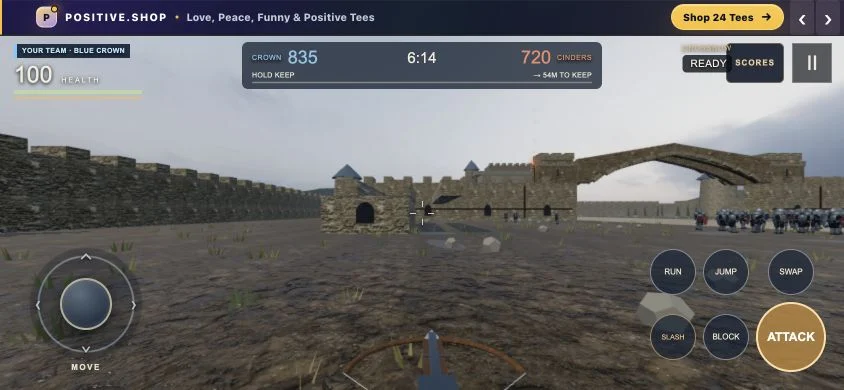
The live multiplayer server has 128 combatant slots, split into two teams of 64. Human players replace AI bots when they join. Empty slots remain AI, and the game displays the current human and bot counts. This is not a claim that 128 people are online.
Each round lasts ten minutes. Escort or stop the ram, breach or defend the gate, fight through the courtyard and contest the keep. Use the live objective on the HUD to find where your team needs you.
Open Scores to see kills, deaths, assists and time contributing to objectives. Humans and bots are labelled separately. Results are for the current round, with no persistent account progression.
Your first fight
- Open SwordFury and choose Play the Siege after the battlefield loads. Choose the Practice Arena instead to learn against a local AI partner.
- Move with WASD and aim with the mouse. Click to attack, press 1 for crossbow or 2 for sword, Shift to sprint and Space to jump. Press V to switch first- and third-person views, or tap the 3RD / 1ST button. A controller uses the right-stick click.
- With your sword, hold right mouse or Q to block. Time a block as an attack arrives to parry, then attack for a riposte. E toggles heavy attacks; F feints during windup.
- Follow the siege objective and work with your team. Open the pause menu with Escape to adjust controls, graphics and audio, or leave the battle.
Practice runs locally with an AI partner. It is separate from the online multiplayer match. The online battle continues while your pause menu is open.
Turn sideways. Join the battle.
Touch controls are included. Landscape gives you more room to see the fight: drag the left joystick to move, drag the battlefield to aim and use the Attack, Block and Swap buttons. The pause menu includes touch layout and button-size settings.
On iPhone, Safari's browser bars may remain visible. Use Share → Add to Home Screen → Open as Web App for a view without Safari bars. Performance depends on your phone and browser; use Auto or Low graphics if needed.
Is this your kind of game?
Try SwordFury if you want a free browser game with first-person sword combat, quick medieval team battles and objectives beyond getting kills. The practice arena also gives you a place to learn parries before joining the siege.
This is an early browser alpha. Expect simpler graphics and fewer features than a full desktop medieval combat game. There are no private lobbies or persistent account progression. SwordFury is an original game and is not affiliated with Chivalry 2.
Before you play
Is SwordFury free?
Yes. The current browser alpha is free to play, with no account, download or payment required. An advertising banner appears above the game.
Is it multiplayer or only bots?
The live siege supports human multiplayer, with AI bots filling empty slots. The population display tells you how many humans and bots are present. The separate practice arena is local play with AI.
What do I need to play?
A modern browser with JavaScript, WebGL and hardware acceleration enabled. An internet connection is required to load the game and play multiplayer. Desktop mouse and keyboard and mobile touch controls are available.
Can I turn off the footsteps or music?
Yes. Open the pause menu and set Footsteps or Background music to zero. They have separate volume controls, so you can keep combat sounds on.
Where can I get help?
See support and troubleshooting, the privacy notice or terms. The game is still in development, and features may change.